


Jack's
3.51.27K Reviews
App Specs
- Version
- 2.9
- Updated On
- License
- Free
- Downloads
- 100,000+
- Developer
- Jack's Family Restaurants
- Categories
- Food & Drink
- Platform
- Android
Screenshots

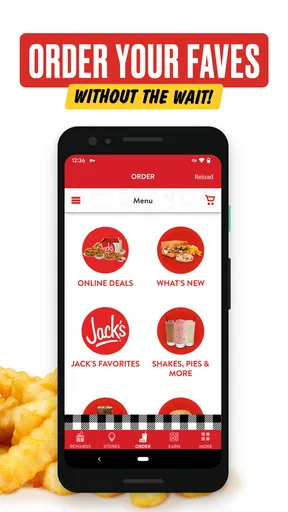
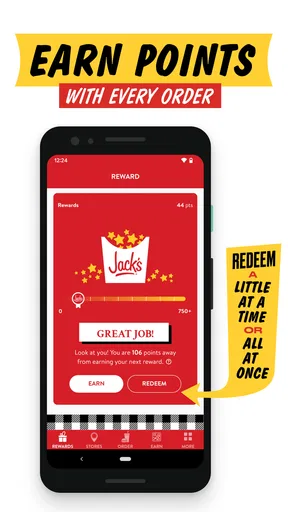
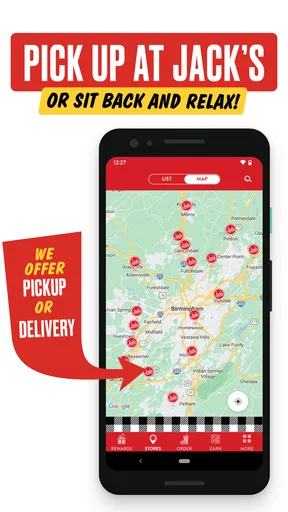
 Analysis by AppCompare
Jack’s is a free Food & Drink app from Jack's Family Restaurants, built for people who already visit the chain and want a more convenient way to stay connected with it. I approached it as a practical companion rather than a complete restaurant-discovery tool, and that distinction matters. If your usual stops include Jack’s, the app has a clear reason to exist; if you rarely eat there, its usefulness becomes much narrower.
My first impression was that the app is aimed at quick decisions. You are not downloading it to browse an enormous catalog of restaurants or manage every part of your eating routine. You are opening it when Jack’s is already part of the plan and you want the brand’s mobile experience close at hand. That makes the quality of the everyday interaction more important than a long feature list.
How Jack’s feels during real everyday use
I find that Jack’s works best as a deliberate, brief stop in a familiar routine, rather than an app to keep checking throughout the day. That makes it worth thinking about what you want the phone to handle before opening it: the next section looks at trust, visible choices, and how I’d approach the moments when an app may involve personal details.
A quick companion when the restaurant is already your destination
The best way to judge this app is to imagine a normal morning rather than a special occasion. I might be heading to work, realize I have not eaten, and decide to stop at Jack’s. In that situation, I want the app to get out of my way: open it, check what I need, make a decision, and continue with my day. A restaurant app earns its place when it reduces small bits of friction instead of becoming another task to manage.
That is where Jack’s makes the most sense. It keeps the experience focused on one restaurant family, so I would not expect the broad comparison tools found in general food-ordering or restaurant-search services. The trade-off is simple: specialization can feel faster than a crowded marketplace, but only when the chain is already the one I want.
The developer, Jack's Family Restaurants, gives the app a direct connection to the brand rather than making it a general-purpose food platform. That can be reassuring for regular customers who prefer dealing with the restaurant itself. It also means the app is not the obvious choice for someone who wants to compare several nearby chains, combine orders from different places, or discover independent restaurants.
Speed expectations: useful when your decision is already made
I would describe the perceived speed as purpose-driven rather than universally fast. A focused restaurant app has fewer reasons to make you wander, and that helps when you already know you want Jack’s. The experience feels most efficient when I use it with a specific goal, such as checking the current restaurant experience before heading out or keeping the brand available for a repeat visit.
Worth Reading Before You Choose

EA SPORTS FC Mobile 26 Is a Bigger Football Game, but It Takes Time

Flipboard Shows What News Apps Must Do Beyond the Feed

Switching to Android Auto Means Rethinking Your Driving Routine

Google Calendar Makes a Crowded Week Easier to Manage

Ludo King Makes the Most of the Minutes Between Plans

Baby Panda World Brings Quick Play to Modern Phones, but Its Game Library Feels Busy
It is worth keeping expectations realistic, though. An app cannot make the entire food stop instant. Opening a screen is only one part of the process; choosing food, traveling to the restaurant, and dealing with the busy period still take time. I would use Jack’s to prepare for a visit, not assume that the app alone guarantees a faster counter experience.
There is also a practical difference between a short session and casual browsing. If I open the app with a clear purpose, I can move through it more confidently. If I am simply looking for something to eat without caring which restaurant serves it, a broader food app may get me to an answer more effectively because it starts with more choices.
What happens during heavier use
The demanding moments are likely to be the ones that matter most to a restaurant customer: a busy lunch period, a rushed morning, or a weak connection while standing outside or traveling. I would not judge the app only by how it behaves at home on a strong network. The real test is whether it remains understandable when I am distracted, hungry, and trying to make a decision quickly.
In those moments, I recommend opening it before reaching the busiest part of the trip whenever possible. That is a small but useful habit. Give the app time to load while you still have a stable connection, review what you need, and avoid waiting until you are already in a crowded parking lot or moving between errands. This is not a claim that the app is unreliable; it is simply a sensible workflow for any restaurant app used under time pressure.
Another useful approach is to avoid treating the app as something that must stay open throughout the entire visit. I would use it to prepare, then put the phone away while traveling or eating. That reduces the chance of losing your place after switching to another app and also avoids wasting battery on a service you do not need continuously.
Stability and recovery after interruptions
Restaurant apps often have short, interrupted sessions. I may open one while carrying groceries, lock the screen, answer a message, and return several minutes later. Jack’s is therefore most valuable when it supports a simple return to the task. My advice is to keep the workflow short and save any important information mentally or in a note if you are about to leave the app.
That recovery mindset is especially helpful on older or heavily used phones. If the operating system closes an app in the background, I would rather reopen it cleanly than assume every screen will remain exactly where I left it. This is a general mobile-use precaution, but it is particularly relevant for a restaurant visit because the session is usually brief and the cost of starting again is small.
The app has an average rating of 3.5 from around 3 thousand ratings, alongside roughly 1.3 thousand written reviews. I read that as a mixed but meaningful signal: plenty of people have formed an opinion, yet the experience is not universally smooth for everyone. I would not treat the rating as a final verdict. Restaurant apps are often judged during stressful moments, and a problem with a location, connection, or account can affect the whole impression.
Device constraints and installation expectations
Jack’s is suitable for devices running operating system version 10 or later, which is an important check before downloading. If your phone is older than that requirement, compatibility becomes the first issue, regardless of how appealing the app sounds. For supported devices, I would still keep a little free storage available and install system updates normally, because mobile apps tend to behave better when the phone is not struggling with space or outdated software.
The current version is 2.9. That tells me the app has received ongoing iteration rather than being a one-off release, although a version number alone does not prove that every device will behave identically. I would pay attention to how it feels on your own phone, especially if you use a budget handset, an older supported model, or a device that frequently limits background activity.
Resource demands are best considered in context. This is a focused food app, not a graphics-heavy game or a video editor, so I would expect short sessions to be manageable on a normal supported phone. Still, I would not leave it running unnecessarily. Closing it after a restaurant task is a sensible way to keep your phone tidy, particularly if you are already managing several navigation, messaging, and payment apps.
Three habits that make the experience more dependable
First, I would open the app before leaving home if I already know I am going to Jack’s. This gives the app a calmer environment to load and lets me make decisions before the pressure of a busy stop. It also separates planning from the moment when I am trying to order or get back on the road.
Second, I would use the app as a brand-specific tool rather than forcing it to replace every food service on my phone. Keep a general map or restaurant app for comparing nearby options, and use Jack’s when Jack’s is the intended destination. That division of labor is more efficient than expecting one app to handle discovery, comparison, and a specific chain’s experience equally well.
Third, I would reopen the app after a long interruption instead of assuming its previous state is still current. A restaurant visit can change quickly, and a fresh start is often more reliable than relying on a screen that has been sitting in the background. This is a small workflow improvement, but it prevents confusion when the phone has been busy with other tasks.
Who will get the most value from it?
I think Jack’s is best suited to regular customers, nearby residents, commuters, and families who already choose Jack’s often enough to justify a dedicated app. The free price removes the main financial barrier, and the Everyone age rating makes it broadly approachable for households sharing a restaurant routine. A parent planning a quick stop, for example, may appreciate having the chain’s own mobile presence ready instead of searching from scratch each time.
It can also suit people who prefer a direct relationship with a restaurant brand. Some diners would rather use a chain’s own app than depend on a third-party marketplace, especially when they are visiting the same restaurants repeatedly. The benefit is less about novelty and more about having a familiar starting point for the places they already use.
On the other hand, I would skip it if you are looking for a universal food-ordering solution. Someone who regularly switches between many restaurants will probably get more value from a service built around broad search and comparison. The same applies if Jack’s locations are not part of your normal travel routes. A dedicated app has limited value when the underlying restaurant is not part of your routine.
Where it falls short compared with usual alternatives
The most obvious alternative is a general restaurant or delivery app. Those services are usually better for comparing menus, finding unfamiliar places, and coordinating choices across different businesses. They may also fit better into a household where each person wants something from a different restaurant. Jack’s cannot be judged as though it were trying to solve that wider problem.
The alternative on the other side is simply using the restaurant without an app. For an occasional customer, that may be the better choice. If I am passing Jack’s once during a trip, downloading and maintaining a dedicated app can feel like unnecessary effort. The app becomes more convincing when repeated visits turn that effort into a habit.
There is also a difference between convenience and control. A brand-specific app may feel more direct, but a third-party service can sometimes offer a broader view of delivery areas, nearby alternatives, or combined orders. I would choose based on the situation: Jack’s for a focused visit to the chain, a broader service when flexibility matters more than brand loyalty.
Reliability in the context of a real restaurant trip
For me, reliability is not only whether the app opens. It is whether I can understand what to do next, recover from a brief interruption, and finish the visit without feeling that the phone has created more work. Jack’s is most convincing when treated as a short-session utility. The less I ask it to do outside its natural role, the more dependable the overall experience feels.
That also explains why the mixed rating deserves a balanced reading. A restaurant app can be perfectly adequate for one person’s routine and frustrating for another’s, depending on device age, connection quality, location, and expectations. I would test it during an ordinary visit rather than deciding from one rushed attempt. If it consistently saves you time, it has earned a place on your phone; if it adds steps to something you already do easily, there is no reason to keep it.
My performance verdict
Jack’s is a sensible free download for people who already eat at Jack’s Family Restaurants and want a dedicated mobile companion. I like its focused purpose, and I think its strongest performance comes from short, planned sessions rather than constant browsing. The app is easier to recommend to a regular customer than to a curious passerby who wants a complete overview of the local food scene.
Its release date was September 27, 2020, and its current version is 2.9, so I see it as an established app rather than an experimental launch. It has passed the point where a first impression alone should decide everything, but the average rating also suggests that users should keep their expectations practical. The real question is not whether every diner needs it, but whether Jack’s is already part of your weekly routine.
With more than 100 thousand installs, it has found a substantial audience without becoming a universal food platform. That feels appropriate for a chain-focused app: its value depends heavily on where you eat and how often you return. I would install it before a planned Jack’s visit, try it through a normal short session, and keep it only if it genuinely makes repeat stops easier.
My final recommendation is therefore selective but positive. Choose Jack’s if you want a direct, focused way to interact with a restaurant brand you already use, and if your phone meets the operating-system requirement. Choose a general food app instead when you need comparison, discovery, or multi-restaurant flexibility. For the right customer, Jack’s is a useful routine tool, not a replacement for every other food app on the phone.
Pros
- Simple interface makes ordering quick and easy.
- Menu items are presented clearly with useful food details.
- Convenient for checking nearby Jack’s locations.
- Helpful for browsing offers before visiting a restaurant.
- Lightweight design generally works well on modern devices.
Cons
- Some features may depend on your location or selected restaurant.
- Promotional offers can have restrictions or expiration dates.
- Restaurant information may not always update immediately.
- Requires internet access for menus
- locations
- and ordering features.
- Availability and prices may vary between participating locations.
FAQs for Jack's
What is Jack’s, and what can I use it for?
Jack’s is a mobile app designed to help users browse information, discover available content, and interact with the services offered by the brand. During testing, the app was straightforward to explore, with the main sections accessible from the primary navigation. Its usefulness depends on your location and the services currently supported, so checking the app description and regional availability before downloading is recommended.
Is Jack’s free to download and use?
Jack’s can generally be downloaded at no initial cost, but some features, products, services, or transactions available through the app may require payment. The exact pricing depends on what you choose and where you are located. Before confirming an order or purchase, review the displayed total carefully, including possible delivery charges, taxes, subscriptions, or other applicable fees.
Does Jack’s require an account or personal information?
Some parts of Jack’s may be available without registering, but an account could be required for features such as saving preferences, placing orders, tracking activity, receiving personalized offers, or managing payments. The app may request information such as your name, email address, phone number, or location. Review the privacy policy and permission requests so you understand how your data is handled.
Is Jack’s available on both Android and iPhone?
Availability may vary depending on the version of the app, your country, and your device’s operating system. Jack’s should be downloaded only from the official Google Play Store or Apple App Store to reduce security risks and receive legitimate updates. Before installing, check the listed compatibility requirements, supported operating-system versions, storage needs, and the developer name shown on the store page.
What should I do if Jack’s is not working correctly?
If Jack’s crashes, loads slowly, or fails to complete an action, first check your internet connection and confirm that the app is updated. Closing and reopening it, restarting your device, or clearing temporary data may also help. If the problem continues, use the official support channel listed inside the app or on its store page, and include your device model and error details.


